Managing a graveyard in Graveyard Keeper 2 is a lot of work, from crafting and farming to autopsies, research, and keeping your Keeper’s energy up. PLITCH gives you more control with Graveyard Keeper 2 mods and cheats that let you adjust resources, speed up tasks, unlock progression, and shape your single-player experience.
Last updated: September 2026
Table of Contents
Keep Your Energy Up and Insanity Down
Almost everything you do in Graveyard Keeper 2 consumes energy, from gathering and crafting to digging graves and performing autopsies. Once your energy runs out, you must stop working until you eat or sleep.
Restore Energy gives you an immediate boost whenever your bar runs low, while Set Energy lets you adjust the amount directly. If you want to remove energy management altogether, Unlimited Energy lets you keep working without worrying about the usual limit.
Insanity adds another layer of resource management. Cleanse Insanity lets you clear the accumulated effect immediately, while Set Insanity gives you direct control over how much Insanity your Keeper has.
Speed Up Your Crafting and Production
Crafting in Graveyard Keeper 2 quickly becomes a major part of your daily routine. A simple request can mean gathering raw materials, processing them at a workstation, carrying the results elsewhere, and waiting for another production step to finish. With so many crafting stations and production chains to manage, that routine can become quite time-consuming.
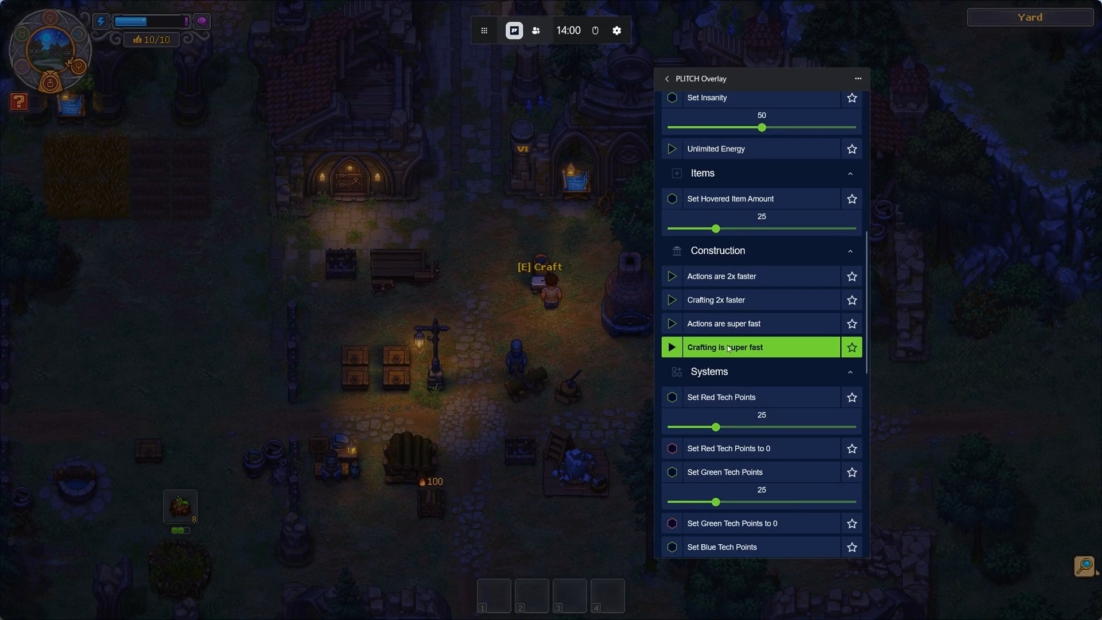
“Actions are 2x faster” and “Actions are super fast” speed up the work you perform directly, making tasks such as gathering, digging, and other manual jobs less of a time sink. For production at crafting stations, “Crafting 2x faster” and “Crafting is super fast” reduce the time you have to wait for your goods to be ready. You can queue up production and get back to other parts of your Keeper’s work.
Want to skip waiting and resource requirements altogether? Instant Crafting Stations + Farms lets you complete production and farming immediately, while Free Craft/Build removes the usual resource cost. That makes it much easier to experiment with new buildings, expand your facilities, or simply focus on management and exploration rather than gathering materials for each project.
Take Control of Time and Weather
Days in Graveyard Keeper 2 pass quickly, with a full in-game day lasting only about 7.5 minutes in real time. Because activities and weekly events are tied to specific times or days, it can be frustrating when you run out of time before finishing everything on your list.
Set Time (0-24) lets you set the clock to any time of day you need. Use it to reach a specific time for an activity, give yourself more daylight for working around the graveyard, or simply avoid waiting for the right time of day.
Weather is another element of the game’s dynamic world, with thunderstorms and other weather effects adding variety to the environment. Clear Weather lets you remove unwanted weather conditions, giving you a more predictable environment as you work, explore, and manage your growing graveyard.
Build Up Your Skills Faster
Progression in Graveyard Keeper 2 isn’t limited to the technology tree. Your actions also contribute to different Inspiration branches, which can eventually grant you talent points to spend on perks. Because woodworking, engineering, farming, scribing, and autopsy each have their own progression, unlocking the perks you want can take quite a bit of focused work.
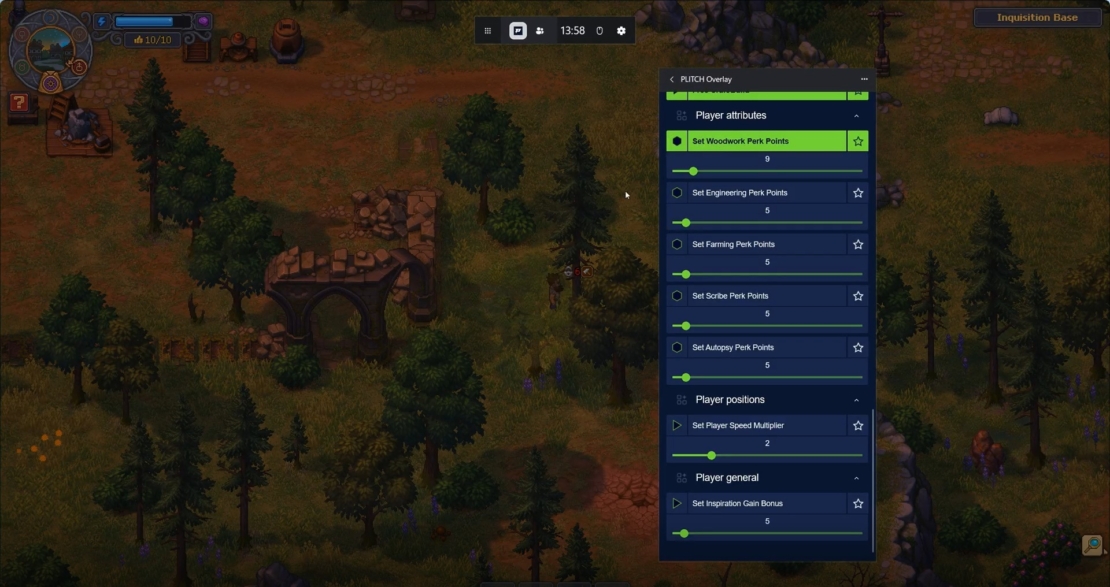
Set Woodwork Perk Points and Set Engineering Perk Points let you adjust your available points in their respective branches. Use them to unlock perks without spending as much time repeating the activities associated with those skills. The same applies to Set Farming Perk Points, Set Scribe Perk Points, and Set Autopsy Perk Points.
Make Fishing Faster and Easier
Fishing can be a useful way to gather food and other resources in Graveyard Keeper 2, but waiting for a fish to bite can make the process feel slow, especially when you need to catch several fish. Instant Fishing speeds up the process so you can catch fish without the usual wait. Fish Bite Instantly targets the waiting time before a fish takes the bait, letting you get to the actual catch much faster.
Unlock More and Spend Freely
Money and Tech Points are central to your progression in Graveyard Keeper 2. Copper Coins let you purchase useful items and services, while Red, Green, and Blue Tech Points are used across the technology tree to unlock new workbenches, buildings, recipes, and other upgrades. Different activities reward different Tech Point colors, so building the right balance can take time.
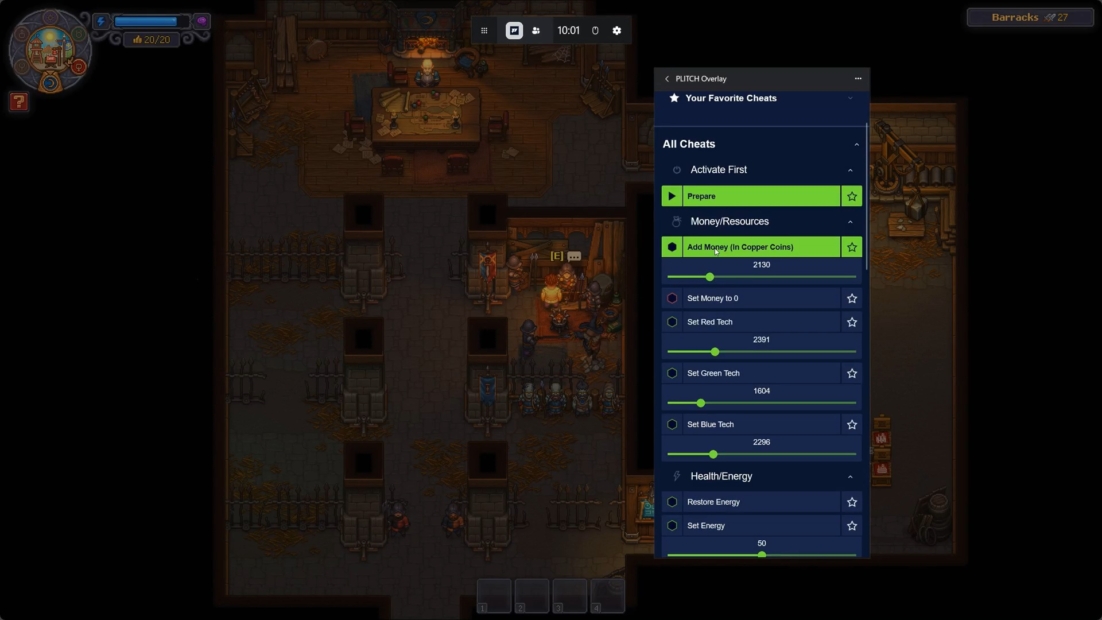
Add Money (In Copper Coins) gives you more Copper Coins whenever you need them, making it easier to afford purchases without worrying as much about your wallet. Setting Money to 0 has the opposite effect, letting you reset your current money amount whenever you want to start from scratch or create your own challenge. For research, Set Red Tech, Set Green Tech, and Set Blue Tech let you adjust your three types of Tech Points directly.
All Graveyard Keeper 2 Mods & Cheats from PLITCH
PLITCH offers many ways to customize your experience, from managing energy and resources to speeding up crafting, altering your progression, and controlling time and weather. Here’s the complete list of available Graveyard Keeper 2 mods and cheats:
Health/Energy
- Restore Energy
- Set Energy
- Cleanse Insanity
- Set Insanity
- Unlimited Energy
- Restore Health (Battle)
- Unlimited Stamina (Battles)
- Infinite Health (Battles)
Items
- Set Hovered Item Amount
- Increase Inventory Size
- Decrease Inventory Size
Construction
- Actions are 2x faster
- Crafting 2x faster
- Actions are super fast
- Crafting is super fast
Buildings
- Free Craft/Build
Player Attributes
- Set Woodwork Perk Points
- Set Engineering Perk Points
- Set Farming Perk Points
- Set Scribe Perk Points
- Set Autopsy Perk Points
Player General
- Set Inspiration Gain Bonus
Money/Resources
- Add Money (In Copper Coins)
- Set Money to 0
- Set Red Tech
- Set Green Tech
- Set Blue Tech
Weapons
- Set Battle Dmg Multiplier (Including Allies)
Player Positions
- Set Player Speed Multiplier
Systems
- Instant Crafting Stations + Farms
- Set Time (0-24)
- Clear Weather
Miscellaneous
- Instant Fishing
- Fish Bite Instantly
FAQ: Graveyard Keeper 2 Mods & Cheats with PLITCH
PLITCH is a PC game trainer that lets you adjust various aspects of your single-player games. In Graveyard Keeper 2, you can use it to manage energy and Insanity, speed up crafting, change your movement and time, adjust resources, and unlock progression more quickly. This lets you reduce repetitive tasks or tailor the management side of the game to your preferred playstyle.
Yes. PLITCH is developed in Germany and is GDPR-compliant and Sectigo-certified. It’s designed exclusively for single-player games and doesn’t offer cheats for multiplayer or competitive gameplay. The trainer temporarily changes values in your PC’s RAM while the game is running rather than permanently modifying the game’s core files.
PLITCH uses a freemium model, allowing you to access select features without a subscription. More than 700 games are completely free to use, and free features include the Cheat Slider, Favorites list, Windows Overlay, and the mobile app. Premium membership provides access to the full cheat library and additional features.
No, PLITCH doesn’t directly modify your Graveyard Keeper 2 save files. Its cheats temporarily change values while the game is running, so they don’t permanently modify your game installation.
Yes. Energy can become a limiting factor when you are gathering resources, crafting, digging graves, or performing autopsies. High Insanity can reduce your maximum energy. Restore Energy gives you an instant refill, and Set Energy lets you choose the amount you want. Unlimited Energy removes the usual limit altogether, while Cleanse Insanity and Set Insanity give you direct control over the other mechanic.
Definitely, several cheats can reduce the time you spend waiting or repeating tasks. Actions are 2x faster and super fast, speeding up manual work, while Crafting is 2x faster and super fast, reducing production times at crafting stations. You can also use perk point cheats for Woodwork, Engineering, Farming, Scribe, and Autopsy, as well as Tech Point cheats, to unlock more of the game’s progression without grinding for every upgrade.
Read more about PLITCH:


 English
  Deutsch